

Payroll, tax and social security — calculated and ready to file
Social security, provident fund and withholding tax calculated per Thai law every run, with payslips on LINE and files for PND 1, SPS 1-10 and 50 Tawi.
Free for 14 days | No credit card required
- Automatic payroll
- Withholding tax from allowances
- Ready-to-file PND 1 and SPS 1-10
- Official 50 Tawi forms
What does month end look like for HR?
- Collecting OT, leave and expense claims from several places before calculating
- Working out withholding tax and social security by hand every month
- Sending payslips one by one as files or emails
- Preparing PND.1 and SSO 1-10 files again before every deadline
Approved data flows into the payroll run; the system calculates and checks against labour law before you close it.
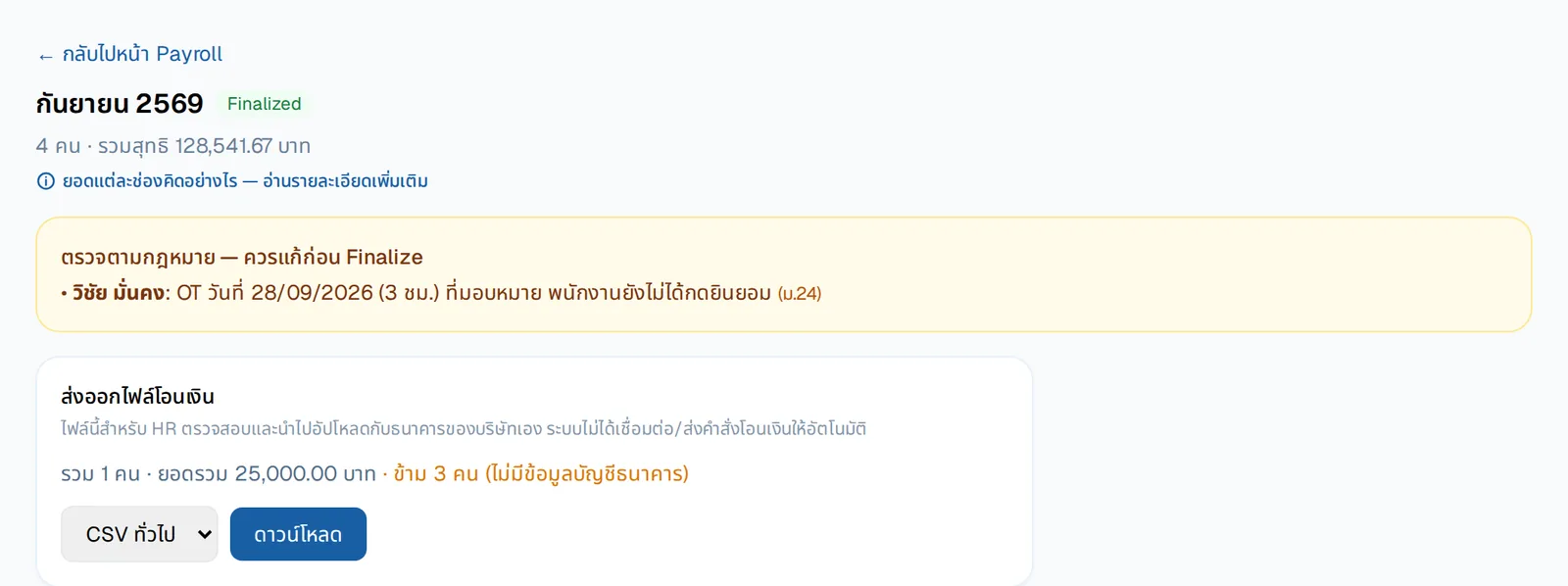
A legal check before you close the run
Before Finalize, the system flags what should be fixed — for example OT that was assigned but not yet agreed by the employee — with the section of law.
- Export a bank transfer file to upload to your own bank — the system never moves money
- Shows who has no bank account details yet
- Download each payslip as PDF
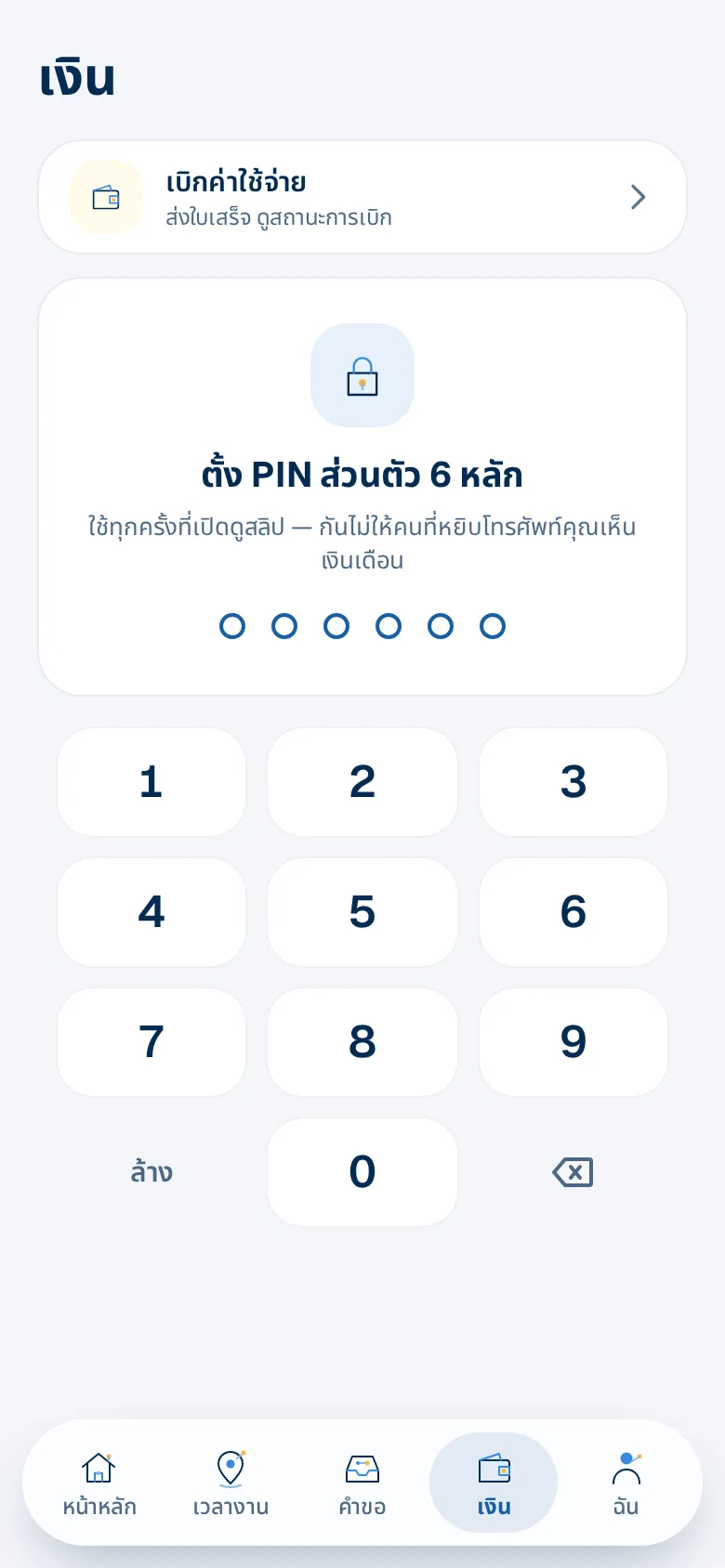
Payslips in LINE, locked with a PIN
Employees set their own 6-digit PIN; salary figures stay hidden until they tap "Show".
- Past payslips always available
- Expense claims from the same screen
What you get
Automatic payroll
Base pay, OT, lateness, expense claims and your own earnings/deductions in one run, monthly or half-monthly.
Withholding tax from allowances
Based on the allowances each employee declares (L.Y.01); bonuses are not over-taxed and year-end tax is adjusted.
Ready-to-file PND 1 and SPS 1-10
Data ready for the Revenue Department e-Filing, or an RD Prep file, plus the Social Security Office Excel file and due-date reminders.
Official 50 Tawi forms
Issue 50 Tawi one by one or for the whole company, stamped with the signature and seal.
PIN-locked payslips on LINE
Employees open their PDF payslip in the app; amounts stay hidden until shown.
Salary advances on LINE
Employees draw wages already earned, up to the cap you set; their manager approves in chat, and once you transfer it goes into the next pay run. No fee.
Two-person pay-run close (optional)
One person requests the close and a confirmer you choose approves it; if the figures change after the request, it must be sent again.
Legal checks before you pay
Deductions within legal limits, no fines, OT ≤ 36 h/week, and daily workers paid for public holidays and leave.
Who gains what
HR
- Approved time, OT and expenses are pulled into the run
- PND.1, SSO 1-10 and 50 Tawi files ready to check before filing
Employees
- Payslips kept in LINE, never lost
- Request a salary certificate themselves
Owners
- Less risk of miscalculating or deducting more than the law allows
- See the total paid every run
How it works
- 1
Set your payroll policy
Social security, tax, fund, earnings and deductions — once.
- 2
Create a payroll run
Approved time, OT and expenses come in; review and finalize.
- 3
Send payslips and file
Employees get payslips on LINE; HR downloads the filing files.
Step-by-step guides: Automatic payroll and tax · PND.1 tax and SPS 1-10 social security filing · Certificates in Thai / English
Frequently asked questions
Can we file e-Filing on a Mac?
Yes — the data is ready to key into the Revenue Department web e-Filing; the RD Prep file is for the Department's Windows program.
Can we pay half-monthly?
Yes — monthly or half-monthly runs, choosing who is in each run.
Can employees get a salary advance?
Yes, if the company turns it on: employees ask on LINE for wages already earned, up to the company's cap; their manager approves, the company transfers it and the system puts it in the pay run. No fee.
What if we don't withhold tax?
Turn withholding off in the payroll policy; 50 Tawi is still issued when there is income.
How is pay worked out for someone who starts or leaves mid-month?
Pro-rata, automatically: salary ÷ days in that month × days employed. Leavers stay in their final month's pay run and the payslip shows the days counted.
More of HRConnext
 NextAI · NextNext — a personal assistant for everyone in your company
 NextMoveNextMove — move from your old program with one file
 DevConnext APIDevConnext API lets your systems pull HR data themselves — no more files
 DevConnext MCPDevConnext MCP: ask your company's HR data through the AI you use, such as ClaudePeople dataAll your employee data in one place, from first day to lastLaw & PDPAThai labour law and PDPA built in from the start
Ready to connect your people and work on LINE?
14-day free trial, no credit card, cancel any time
Start free trial → Chat with us on LINE →