

Next — a personal assistant for everyone in your company
From new hires to management, everyone has Next helping in their own role. Answers come from your real data, each person sees only what their role allows, and Next never decides for you: nothing happens until someone confirms.
Free for 14 days | No credit card required
 NextAI · NextWhat you get
- A personal assistant for employees on LINE
- Request leave by typing
- HR can delegate tasks
- Ask about your company
How many times a day does HR answer the same question?
- "How much leave do I have?" "How many OT hours this month?" every week
- One answer means opening several screens
- Company rules sit in a file nobody opens
Next answers from your company's real data, within the asker's permissions, and only acts after someone confirms.
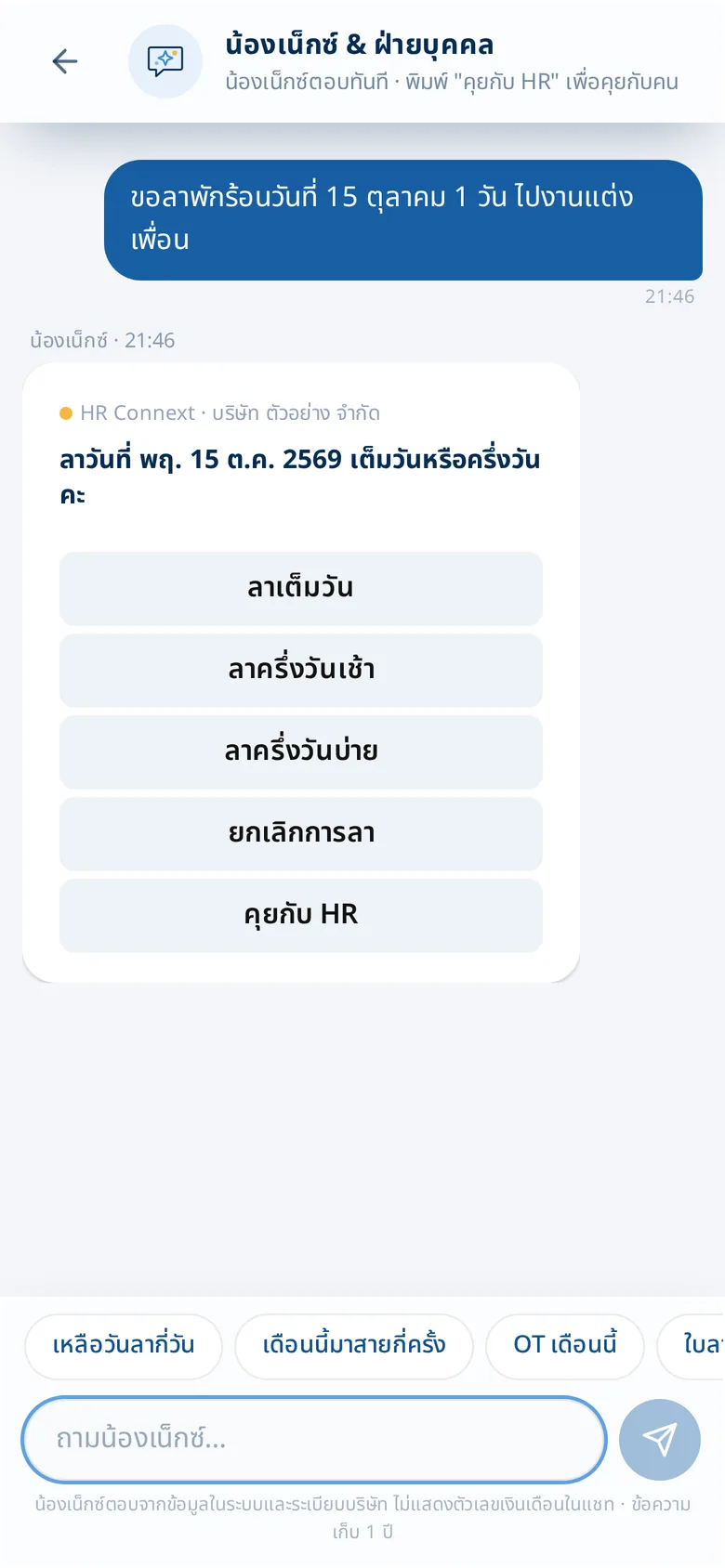
Leave in one sentence
Employees type as if talking to a person. Next asks for anything missing with buttons, then shows a summary to confirm.
- Quick questions such as leave left, late this month, OT this month
- Continue with HR in the same chat
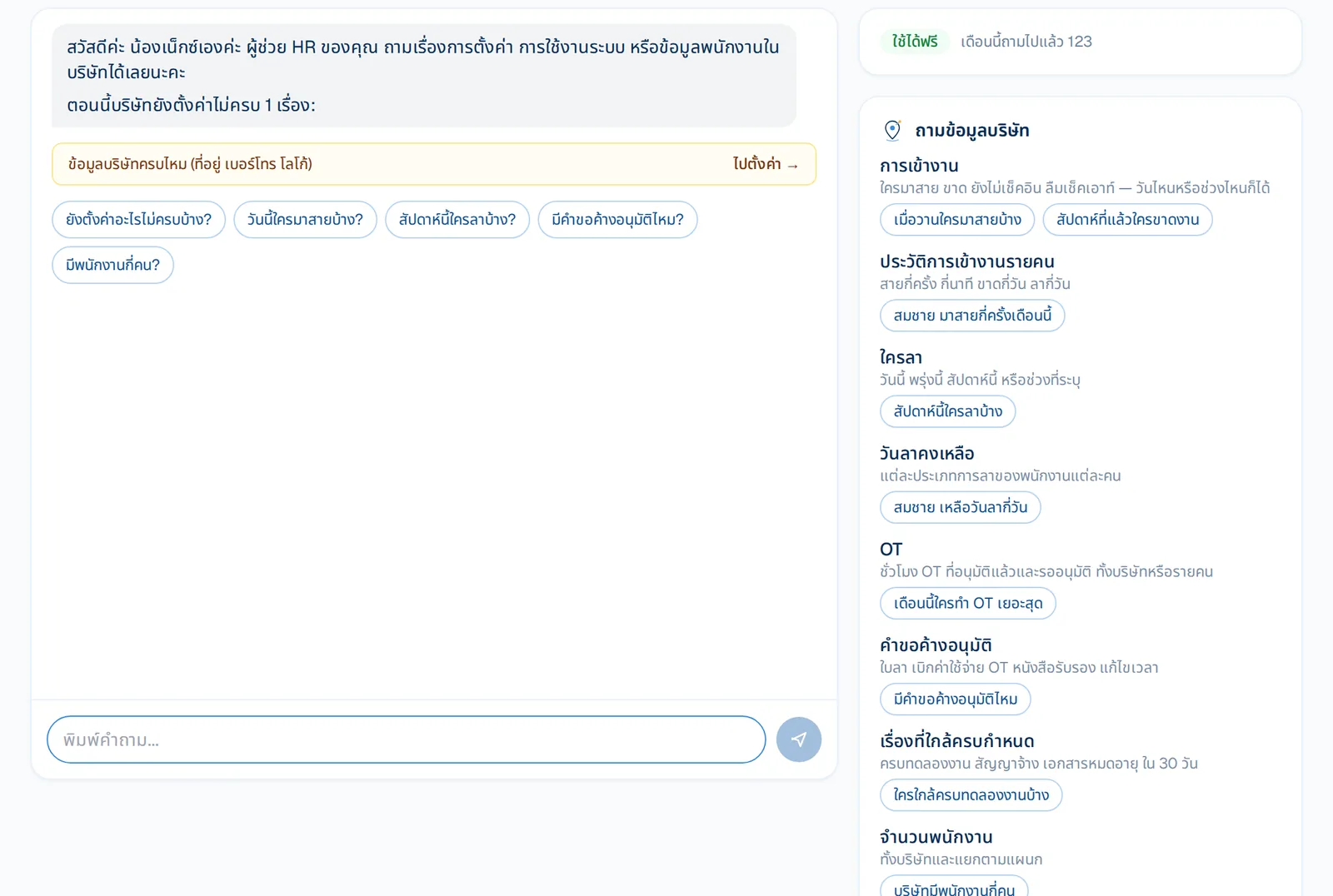
HR asks in plain language
Who is late today, who is on leave this week, what is waiting for approval, who is near the end of probation. Example questions by topic sit next to the chat.
- Also tells you what setup is still missing
- Give it tasks — draft an announcement, assign OT — then confirm
What you get
A personal assistant for employees on LINE
Leave left, times late, OT this month, request status — answered as cards, only their own data.
Request leave by typing
Next asks for what's missing, shows the days and balance, and submits when the employee confirms.
HR can delegate tasks
Draft announcements, add employees, draft warning letters, assign OT, add holidays, set up departments — confirm to act.
Ask about your company
Who is late today, who is on leave this week, what's pending, what's left to set up — as tables with links.
Teach it your company rules
Add your policies, benefits and FAQs and Next answers from them — used to look up answers only, never to train a model.
Private by design
Runs on HRConnext's own servers; numbers come from real data; no salary figures in chat; sensitive data masked.
Who gains what
Employees · on LINE
- Request leave by typing "leave tomorrow"; Next asks what is missing and sums up for you to confirm
- Ask about leave left, lateness, OT this month and their own request status
- Ask about company rules and benefits, answered from company documents
- Ask how to use the app ("I forgot to check out") and get the answer with a button to that page; type /help to see everything they can ask
- If Next doesn't know, hand over to HR in the same chat
Team leads · approvers
- Ask what is waiting for your approval
- Approve or reject several requests in chat, confirming first every time (on the web)
- See who is on leave, who was late and the team's OT
HR
- Draft announcements, surveys and warning letters
- Add new employees, assign OT, set holidays
- Ask about employee data within your role; sensitive data stays masked
- See what setup is still missing, and teach Next your company's own knowledge
- NextMove: matches columns when you move data from your old program
Management
- Ask for the picture any time: headcount, who is on leave or late, today or any period
- What is pending: approvals, probations, contracts and documents coming due
- Payroll and OT summaries (with payroll access)
- Data is not sent to outside AI or used to train models
How it works
- 1
Turn it on
Free on every plan during launch.
- 2
Ask or give an instruction
HR on the web; employees in LINE or the app chat.
- 3
Review and confirm
Nothing is created or sent until you confirm.
Frequently asked questions
Does Next send employee data to an outside AI?
No. Next runs on HRConnext's own servers and your company's data is never used to train a model.
Can employees see other people's data?
No — employees see only their own data; HR sees what their role allows.
What if Next doesn't know?
It says so plainly and offers to hand over to HR; the question is queued so HR can teach the answer.
More of HRConnext
 NextMoveNextMove — move from your old program with one file
 DevConnext APIDevConnext API lets your systems pull HR data themselves — no more files
 DevConnext MCPDevConnext MCP: ask your company's HR data through the AI you use, such as ClaudePeople dataAll your employee data in one place, from first day to lastLaw & PDPAThai labour law and PDPA built in from the start
Ready to connect your people and work on LINE?
14-day free trial, no credit card, cancel any time
Start free trial → Chat with us on LINE →