

Clock in on LINE — attendance you can trust
Employees check in from the LINE they already use, with location and a photo when needed. HR sees who is late or missing in real time — no time clock required.
Free for 14 days | No credit card required
- Check in only at the workplace
- Fix a missed or wrong time
- Shifts and work days per branch
- Late and early leaving, instantly
Still tracking time like this?
- Employees post a photo in the LINE group to say they arrived
- A time clock costs money, needs upkeep — and people still punch for each other
- At month end, HR merges check-in times from several files before payroll
- Every missed check-out means chasing people afterwards
NextMoves time tracking into the LINE your team already uses, and puts everything in one table for HR.
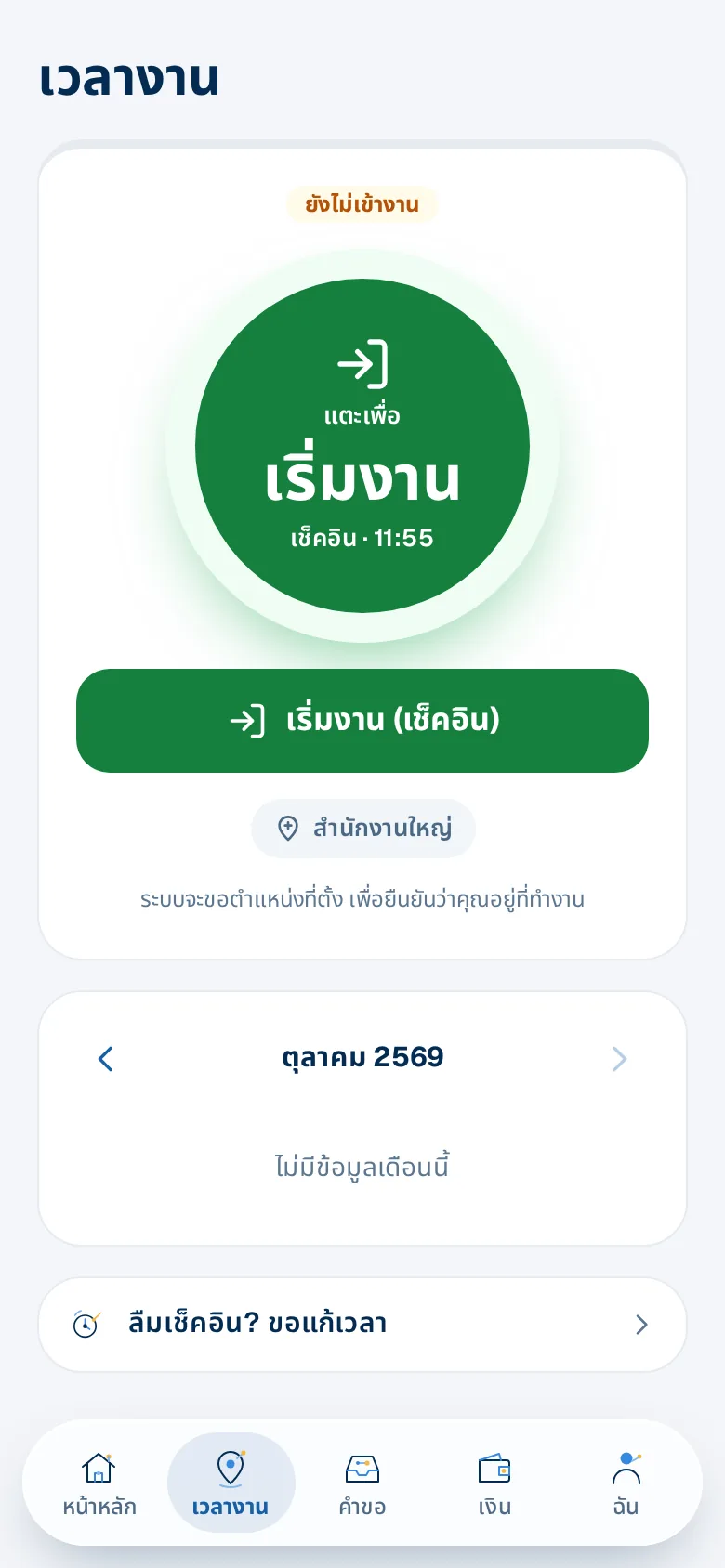
One tap in LINE
Employees open the employee app in LINE and tap "Start work". The system checks their location against the branch you set — no time clock.
- Shows which branch they are checking in at
- Outside the area, a photo is required
- A calendar of days worked, late days and off-site days this month
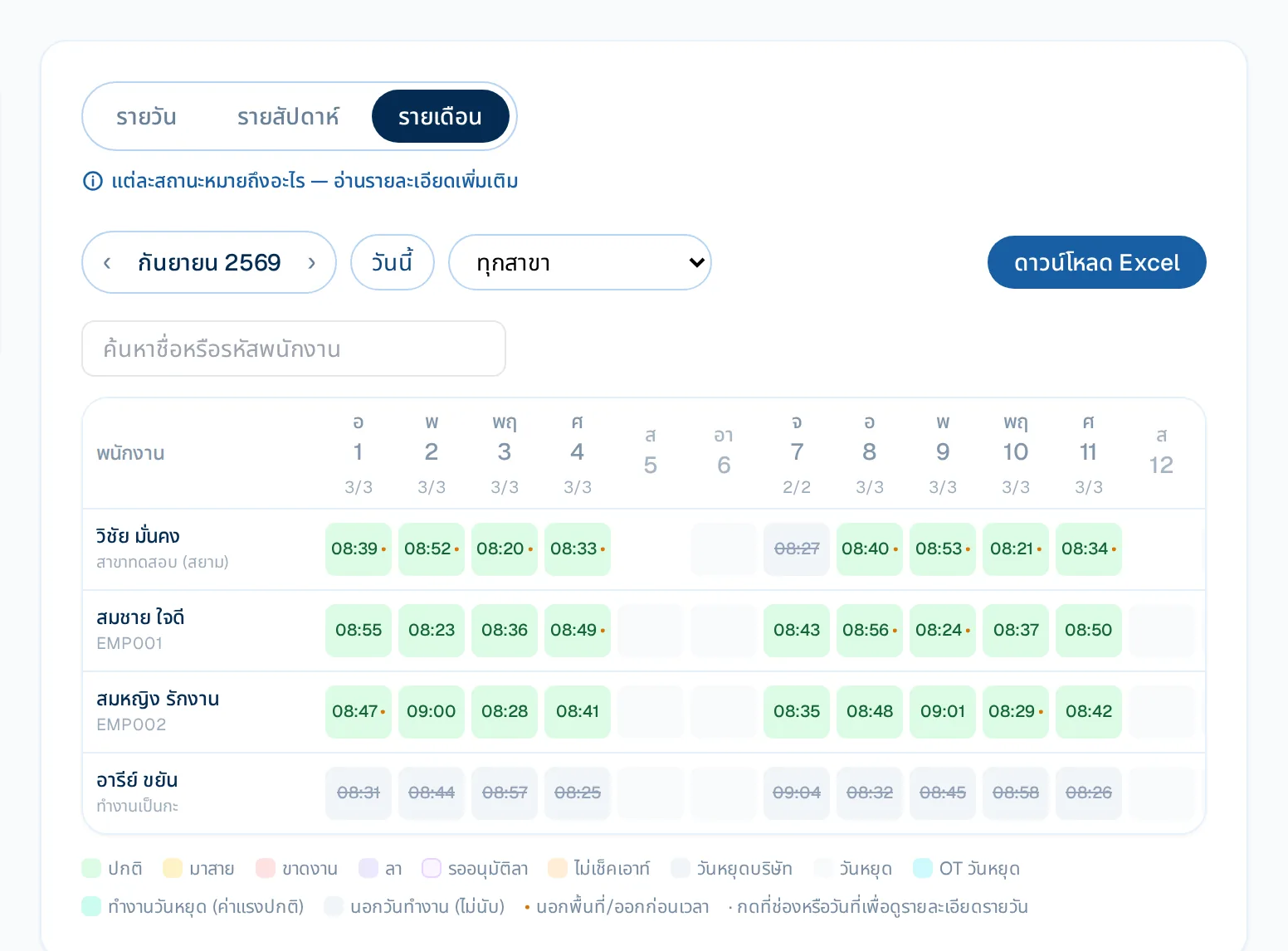
The whole month in one table
Everyone, every day, with real check-in times, coloured by status — normal, late, absent, leave, holiday. Click any cell for that day's details.
- Daily, weekly or monthly view
- Filter by branch, search by name or code
- Download as Excel
What you get
Check in only at the workplace
Set each branch's location and radius; outside it, a photo is required — no buddy punching.
Fix a missed or wrong time
Employees request a correction on LINE; it only changes after approval, with a full history.
Shifts and work days per branch
Shift schedules, working days and hours per branch, company holidays and off-day work rules.
Late and early leaving, instantly
Alerts for late arrival and early leaving, an adjustable grace period, and pay deductions only for the real late time.
Daily, weekly and monthly summaries
Hours across every check-in round, per person or company-wide, downloadable as Excel.
Overtime employees agree to
Employees request OT or accept OT assigned by a supervisor/HR on LINE, at no less than the legal rate.
Who gains what
HR
- No merging files — hours, late time and OT flow into payroll
- Missed check-outs and time fixes go through approval, with history
Employees
- Check in from their own phone, no queue at a clock
- See their own attendance summary every month
Owners
- No time clock to buy or maintain
- Location and photo checks stop buddy punching
How it works
- 1
Set branches and locations
Branches, check-in radius and working hours — once.
- 2
Employees check in on LINE
One tap in the employee app; the location is checked for you.
- 3
HR reviews and runs payroll
Hours, lateness and OT flow into the payroll run automatically.
Step-by-step guides: Check-in / check-out on LINE
Frequently asked questions
Do we need a time clock?
No. Employees check in with LINE on their phone; the location is checked against the branch, with a photo when outside it.
What if someone forgets to check out?
After a check-in stays open for 12 hours, the app offers check-out now or the real finish time, which needs approval.
Can we deduct pay for lateness?
Set a grace period and deduction steps; deductions are only in proportion to real late time, never a fine, per Thai labour law.
More of HRConnext
 NextAI · NextNext — a personal assistant for everyone in your company
 NextMoveNextMove — move from your old program with one file
 DevConnext APIDevConnext API lets your systems pull HR data themselves — no more files
 DevConnext MCPDevConnext MCP: ask your company's HR data through the AI you use, such as ClaudePeople dataAll your employee data in one place, from first day to lastLaw & PDPAThai labour law and PDPA built in from the start
Ready to connect your people and work on LINE?
14-day free trial, no credit card, cancel any time
Start free trial → Chat with us on LINE →