

All your employee data in one place, from first day to last
Profiles, documents, org chart, company assets, warning letters, onboarding and offboarding — no more hunting through Excel files.
Free for 14 days | No credit card required
- Employee records and documents
- Org chart and positions
- Company assets
- Warning letters
In how many places does your employee data live?
- Several versions of the staff Excel file
- No idea whose details or documents are missing
- Company laptops and phones — who has them?
- Management wants an overview but waits for HR to build one
One place for every employee, from day one to their last day, with reports management can open themselves.
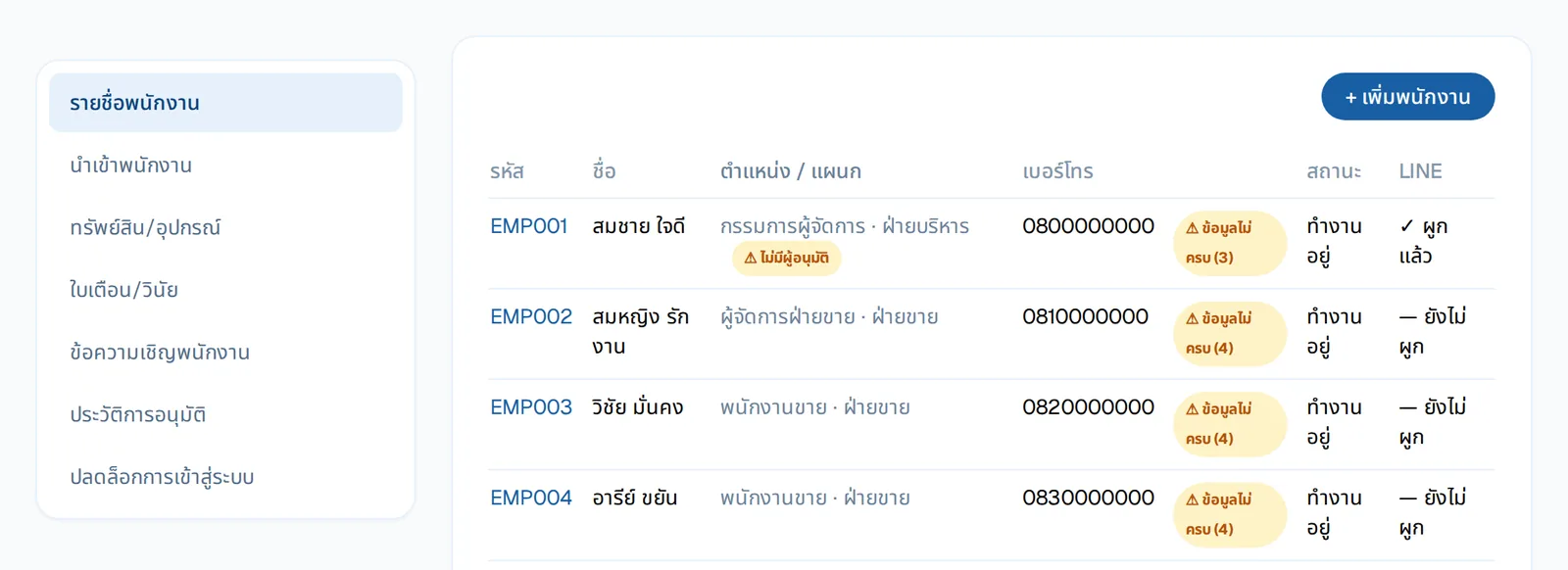
A list that shows what to chase
Position, department, status and LINE link for everyone; an "incomplete" tag shows how many items are missing.
- Import, assets, warning letters and invites in the same menu
- Approval history and unlocking a locked login
HR reports for management
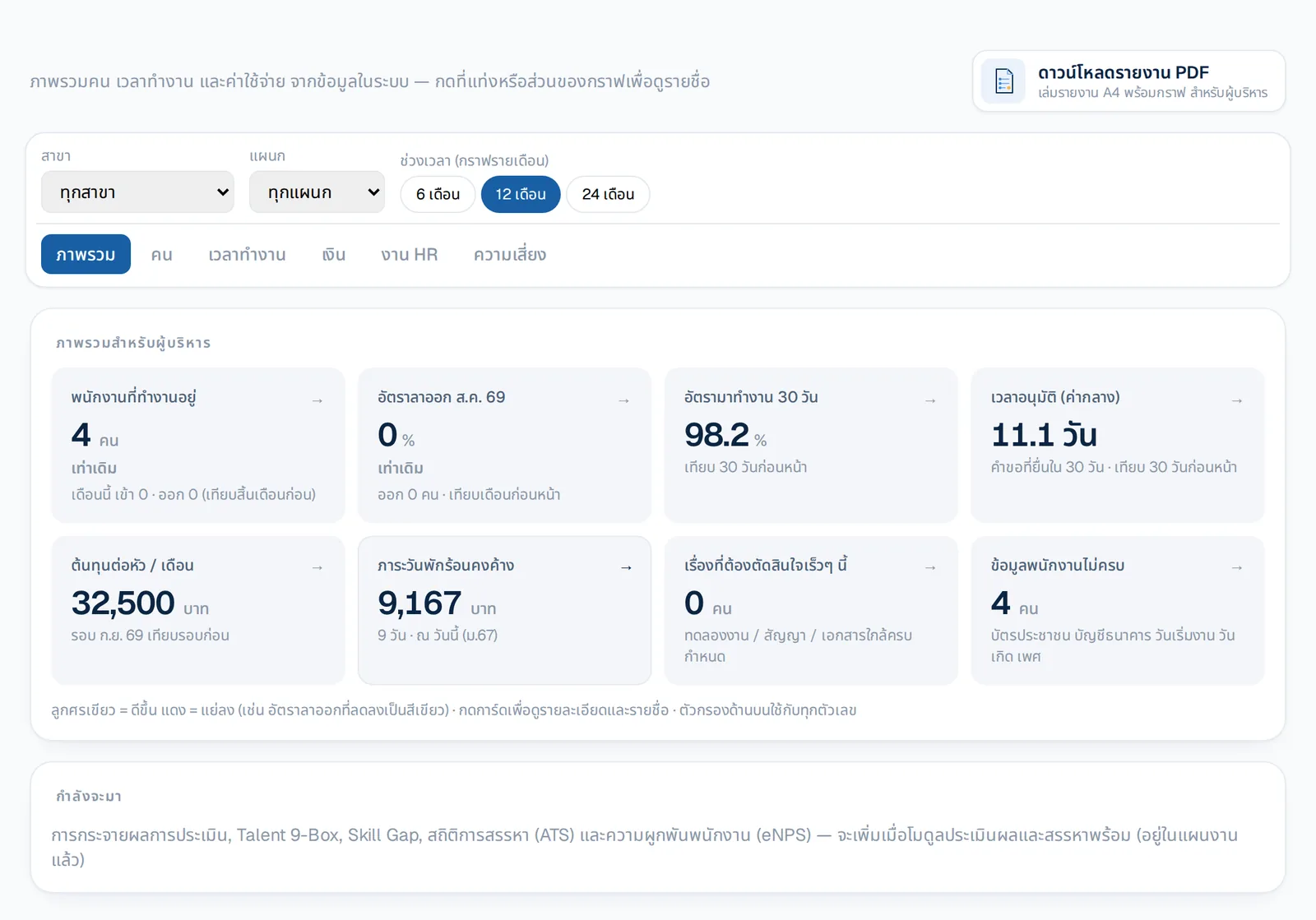
Headcount, turnover, attendance rate, approval time, cost per head and outstanding annual leave — filtered by branch, department and period.
- Click a card to see the names behind the number
- Download as a PDF report booklet
What you get
Employee records and documents
Import the whole company from Excel at once, keep documents private, and see whose data is incomplete.
Org chart and positions
Departments, positions and reporting lines that double as approval chains, with a collapsible chart.
Company assets
Track laptops, phones and ID cards — who has them, since when — and collect them when people leave.
Warning letters
Issue warning letters as PDF, notify on LINE and collect acknowledgement, with a full history.
Onboarding and offboarding
Law-aware checklists, and estimates of severance, pay in lieu of notice and unused annual leave.
HR reports for management
Turnover, hires vs leavers, attendance, cost per head, OT, annual-leave liability and probation coming due — click through to names, or download it all as a PDF report booklet.
See real adoption
The "System usage" page shows who isn't on LINE yet, who never checked in, and which requests are waiting on whom.
Who gains what
HR
- Import the whole company from Excel once
- See at once whose data or documents are missing
Management
- Open the overview themselves
- Drill into the names behind each number
Owners
- Know who holds company assets and get them back at exit
- Severance estimated by length of service, checked before confirming
How it works
- 1
Import employees
Download the template, fill it in, upload — errors shown per row.
- 2
Set up the org chart
Departments, positions and approvers.
- 3
Manage the whole lifecycle
Assets, warnings and leaving, all on one employee page.
Step-by-step guides: Your own org structure · HR dashboard
Frequently asked questions
Can we move data from Excel or our old program?
Yes, with NextMove: upload the file your old program exports, Next matches the data, every field is checked before import and you can undo within 7 days. Included in every plan.
Can it calculate severance?
Yes — severance by length of service, pay in lieu of notice and unused annual leave, for HR to review before confirming.
Is there a summary report for management?
Yes — the "HR reports" page covers 6 areas (overview, people, time, money, HR operations, risks), filters by branch, department and period, and downloads as a PDF booklet with a cover and charts. Per-person pay detail is shown only to payroll roles.
Are national ID numbers safe?
Sensitive data is encrypted separately, masked on screen, shown in full only to authorised roles, and every view is logged.
More of HRConnext
 NextAI · NextNext — a personal assistant for everyone in your company
 NextMoveNextMove — move from your old program with one file
 DevConnext APIDevConnext API lets your systems pull HR data themselves — no more files
 DevConnext MCPDevConnext MCP: ask your company's HR data through the AI you use, such as ClaudeLaw & PDPAThai labour law and PDPA built in from the start
Ready to connect your people and work on LINE?
14-day free trial, no credit card, cancel any time
Start free trial → Chat with us on LINE →