

Leave, expenses and approvals — all in LINE
Every request follows your own approval chain. Supervisors approve from LINE and employees see the result at once — no more requests lost in private chats.
Free for 14 days | No credit card required
- Statutory leave types from day one
- Expense claims with receipts
- Employment and salary certificates
- Approval chains you control
Where are your team's leave requests right now?
- Leave requests sent in chat get buried under other messages
- Nobody knows who has the request or whether it was approved
- Leave balances are counted by hand in Excel
- Receipts for expense claims are photos scattered across chats
Every request goes into your company's approval chain with a clear status, and leave days are counted for you.
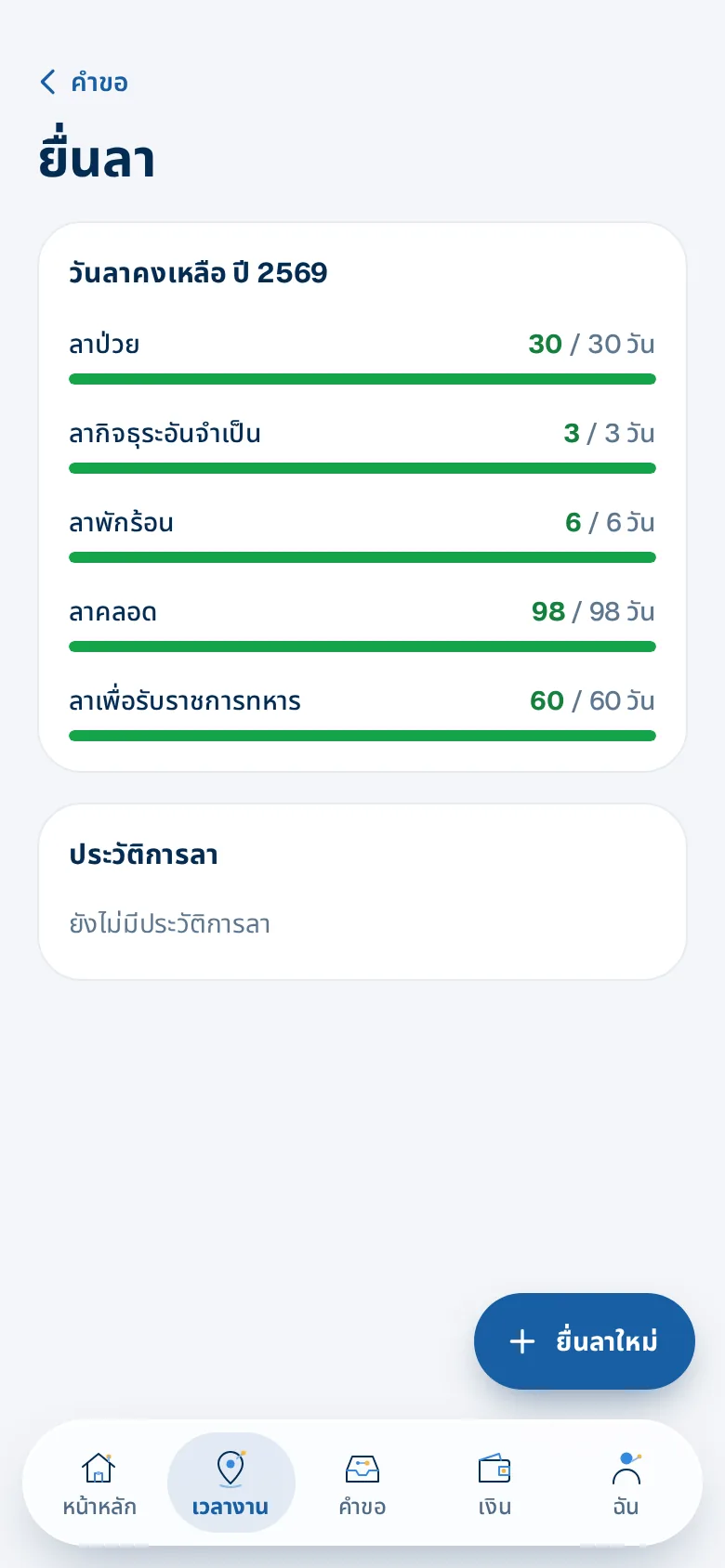
Employees see their balance before they ask
The leave screen shows each leave type — used and remaining — plus leave history and the status of each request.
- Full day, morning or afternoon
- Company holidays are not counted
- Leave, OT and time fixes live under the same "Time" menu
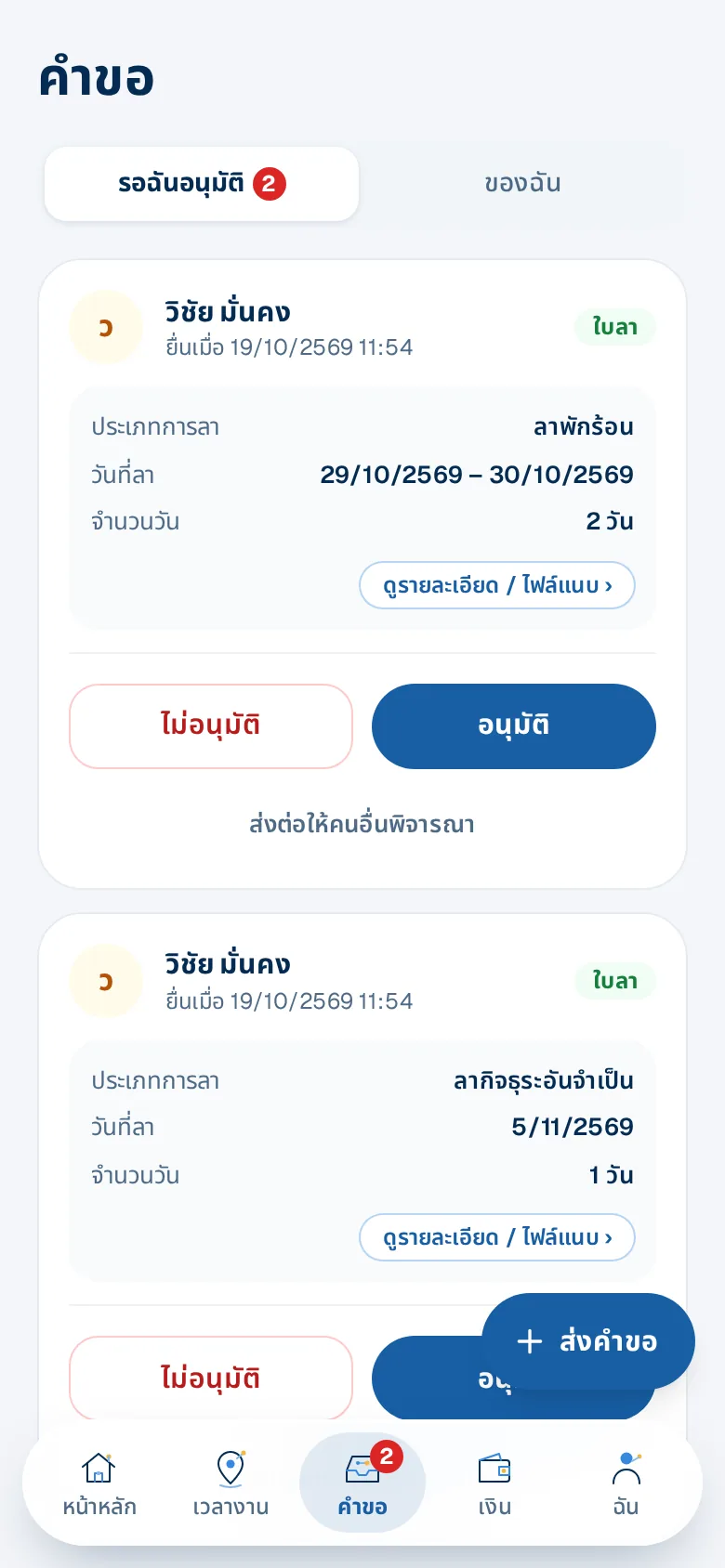
Managers approve from LINE
Requests appear as cards with type, dates and days. Approve, reject, or forward to someone else.
- A team calendar shows who is off when, before you approve
- Delegate approvals while away
- Employees are told the result immediately
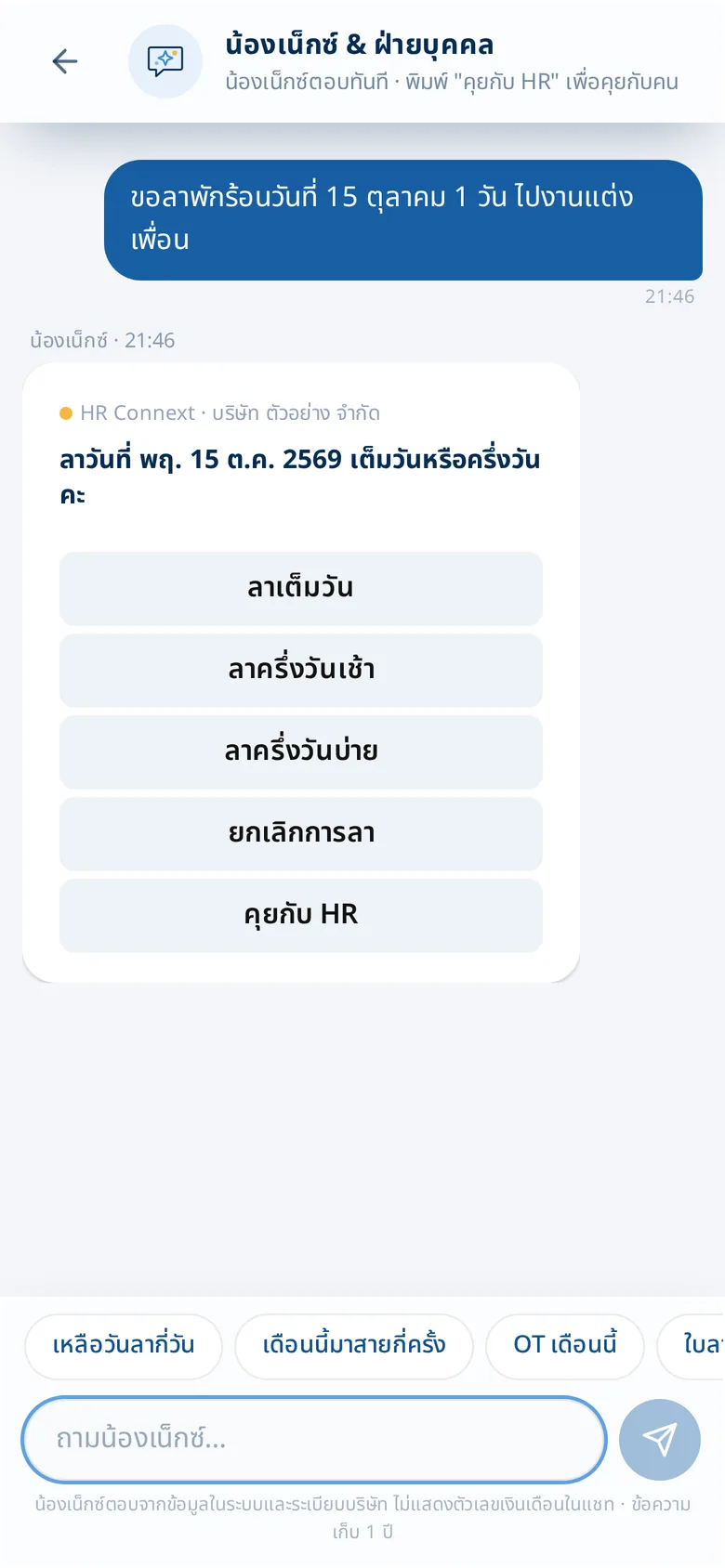
Or just tell Next
Type "I'd like annual leave on 15 October". Next asks for what's missing — full or half day — then shows a summary to confirm.
- No menus to remember
- Goes into the same approval chain
What you get
Statutory leave types from day one
Sick, personal, annual and other statutory leave; annual leave carry-over per your policy; holidays not counted.
Expense claims with receipts
Attach several photos or PDFs per claim; approvers open them before approving, and amounts flow into payroll.
Employment and salary certificates
Employees request them on LINE, in Thai or English, with the company signature and seal.
Approval chains you control
By org chart, multiple levels or named approvers; delegate approvals while you're away.
Approve from LINE, with a reason
Supervisors see requests as cards and approve or reject with a reason; employees see every step.
Request leave by telling Next
Type "leave tomorrow" in chat — Next asks what's missing, shows the balance and submits when confirmed.
Who gains what
HR
- Every request is in the system, not in chat history
- Balances follow company policy and the law
Employees
- Leave, OT, expenses and documents in one place
- Know who has the request and get the answer right away
Managers
- Approve from anywhere on their phone
- Hand approvals to someone else while away
How it works
- 1
Set leave types and approvals
Use the statutory defaults or adjust to your policy.
- 2
Employees request on LINE
Leave, OT, expenses, time fixes and certificates in one app.
- 3
Supervisors approve; it's all recorded
Results go back at once and the approval history is always there.
Step-by-step guides: Leave requests on LINE · Expense claims on LINE · Your own org structure
Frequently asked questions
Can we have multi-step approval?
Yes — supervisor by org chart, several levels, or named approvers, per request type.
Who approves when the supervisor is away?
Supervisors can delegate approvals temporarily or forward a request to someone else.
Can employees take half a day?
Yes — full day, morning or afternoon; days are counted for real, skipping company holidays.
Do I have to type in every public holiday?
No — pick from the year's official Thai public holidays in one click, tick the days the company takes, and edit or delete them later.
More of HRConnext
 NextAI · NextNext — a personal assistant for everyone in your company
 NextMoveNextMove — move from your old program with one file
 DevConnext APIDevConnext API lets your systems pull HR data themselves — no more files
 DevConnext MCPDevConnext MCP: ask your company's HR data through the AI you use, such as ClaudePeople dataAll your employee data in one place, from first day to lastLaw & PDPAThai labour law and PDPA built in from the start
Ready to connect your people and work on LINE?
14-day free trial, no credit card, cancel any time
Start free trial → Chat with us on LINE →