

BizConnext › 360Connext › Features › Requests
The team asks for a quotation or a new customer; accounting works from the request
Employees send requests with the details; handlers see the company queue, take a request, ask for more or refuse with a reason, and make the quotation from it. Requesters always see the status.
- Quotation requests
- New customer requests
- Queue
- Ask for more
Sound familiar?
- Sales sends details in chat and accounting types them again
- No idea how far a request has got
- Requests lost across chat groups
Every request has a number and a status, and handlers make the document from it without retyping.
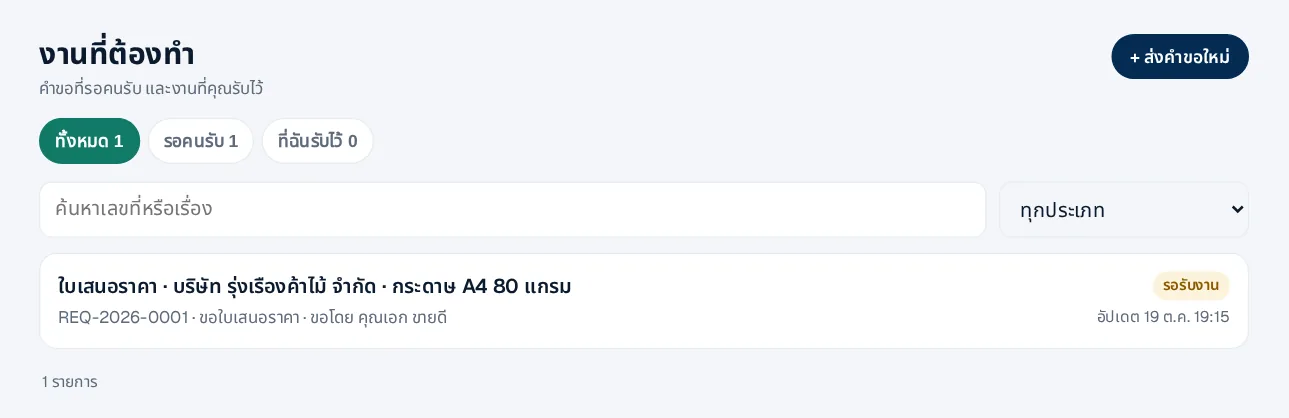
The handler’s queue
Requests waiting for someone and the ones you took, with the requester and last update.
- Take, ask for more, or refuse with a reason
- A quotation request closes when the quotation is issued
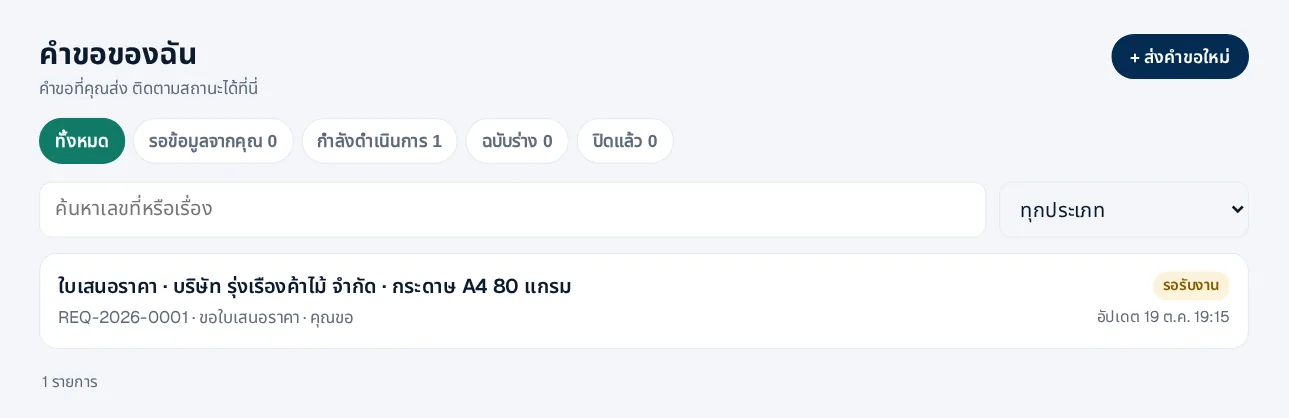
Requesters always know the status
Employees see their requests: waiting, in progress, needs info or done.
- E-mail when done, asked for more or refused
- Cancel while still open
How it works
- 1An employee sends a requestCustomer and items
- 2A handler takes itAsks for more if needed
- 3The document is made from itThe request closes itself
Questions
Who can send requests?
Everyone in the company sends requests and sees their own; those who handle a type see that type’s queue.
A quotation for a customer not yet in the system?
Yes — the request waits for a new-customer request and continues once the customer exists.
Do requesters need the accounting app?
No, they use the request pages and never see the books.
More in 360Connext
Get the whole company started today
Sign up with your e-mail, add employees and send everyone the LINE link. Our team helps you set up for free.
Start your 14-day free trial Talk to us
@bizconnext →