

BizConnext › 360Connext › Features › Bank & reconciliation
Bank & reconciliation
Import bank statements, matched to your ledger
Import a statement file (CSV or Excel) from a Thai bank; the system matches lines to the ledger automatically, and you match, create or skip the rest, then reconcile at month end.
- CSV / Excel import
- Auto-match
- Reconciliation
- Several accounts
Sound familiar?
- Ticking statements against the books line by line
- Missed fees and interest
- Book balance different from the bank
Import once; matching lines are paired for you and only the ones that need a look remain.
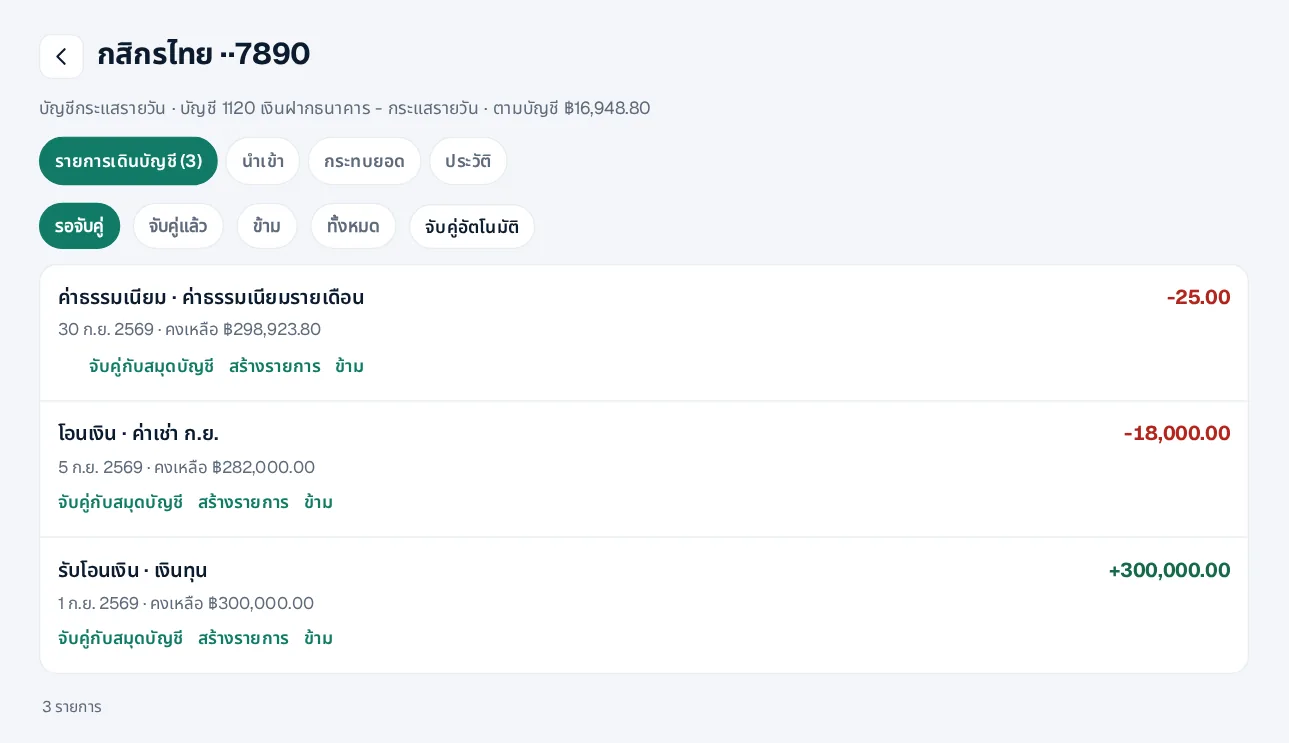
Only what needs you is left
Matched lines leave the queue; match the rest to the ledger, create an entry or skip.
- Many Thai bank layouts; columns found by their headers
- Auto-match
- Reconcile and see history
How it works
- 1Add the bank accountLinked to its ledger account
- 2Import the statementCSV or Excel from the bank
- 3Match and reconcileExact matches come first
Questions
Which banks?
CSV or Excel exports from Thai banks; columns are found by Thai or English headers.
Direct bank feed?
Not yet — import the file you download from the bank.
Importing the same file twice?
Lines already imported are skipped.
More in 360Connext
Get the whole company started today
Sign up with your e-mail, add employees and send everyone the LINE link. Our team helps you set up for free.
Start your 14-day free trial Talk to us
@bizconnext →