

BizConnext › 360Connext › Features › Monthly tax
Monthly tax
PP.30, PND.3 and PND.53 from what is already posted
Sales and purchase tax reports, PP.30 and PND.3/53 computed from documents in the system; one table shows which months are due, filed or paid.
- PP.30
- PND.3/53
- Sales / purchase tax reports
- 50 Tawi
- Filing log
Sound familiar?
- Collecting tax invoices by hand at month end
- Forgetting to file and paying surcharges
- Filed figures that do not match the books
Every figure comes from posted documents, so it always matches the books, and one page shows what is outstanding.
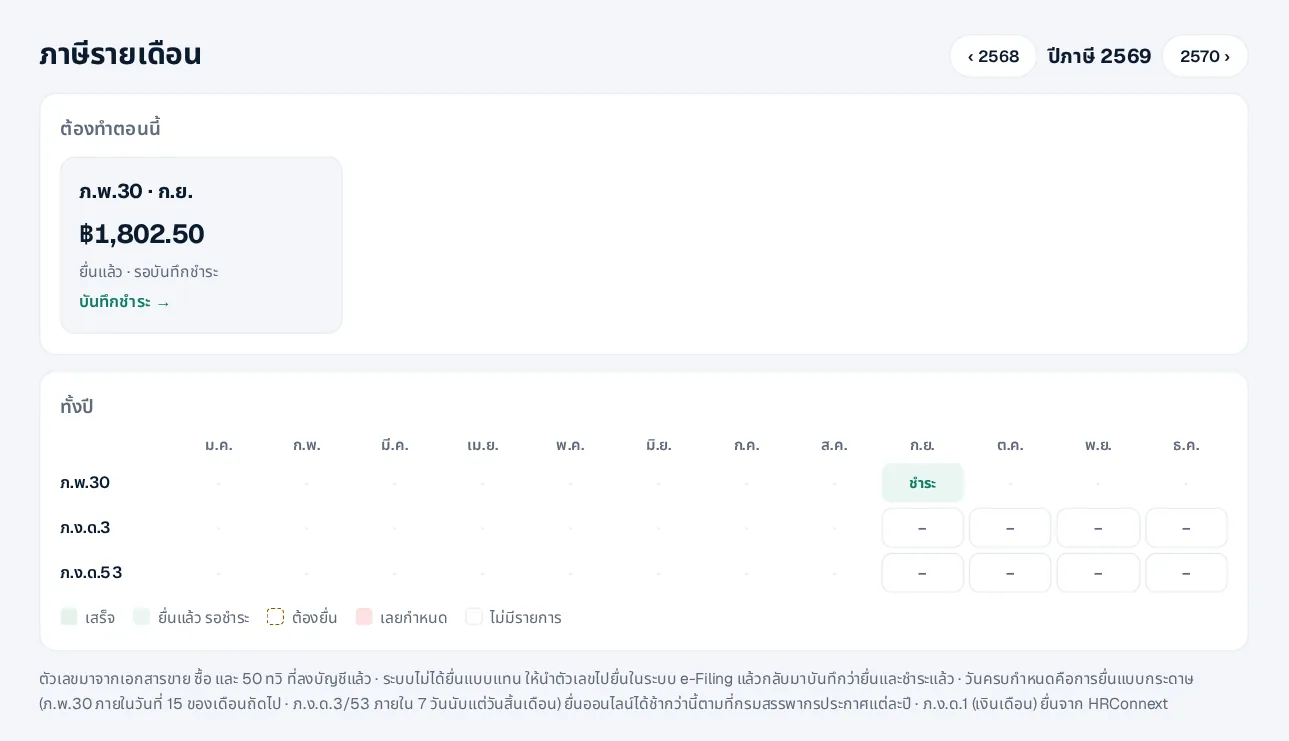
The whole year in one table
PP.30, PND.3 and PND.53 by month: done, filed awaiting payment, due, or late.
- A “do now” card with the amount to file
- Record the filing date and reference
- Shows the due dates
How it works
- 1Work as usualSales, purchases, expenses, withholding
- 2Open the monthReports and the amount to file
- 3File in e-Filing, then record itLog the filing and the payment
Questions
Can I file through the system?
Not yet. It prepares the figures; you file in the Revenue Department’s e-Filing and record the filing and payment here.
Not VAT-registered?
Then no PP.30 is needed and that part is hidden.
Where is PND.1 for salaries?
PND.1 is filed from HRConnext, which computes payroll and employee tax.
More in 360Connext
Get the whole company started today
Sign up with your e-mail, add employees and send everyone the LINE link. Our team helps you set up for free.
Start your 14-day free trial Talk to us
@bizconnext →