

BizConnext › JobsConnext › Features › Offer & hire
Send the offer, then hire into HRConnext without retyping
Make the offer (position, pay, start date, probation), check the PDF and send it. The applicant answers through the e-mail link; once accepted, hire them and HRConnext gets a new employee with the resume and an onboarding checklist.
- Offer letter PDF
- Answer by link
- Minimum wage check
- Employee in HRConnext
Sound familiar?
- Retyping the applicant into the employee system
- Offer letters in Word with no history
- Nothing ready for the first day
From applicant to employee in a few clicks; the data flows from JobsConnext into HRConnext.
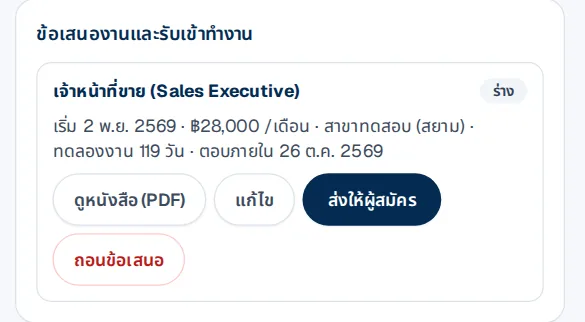
The offer on the applicant page
Position, start date, pay, branch, probation and the answer-by date; check the letter as a PDF before sending.
- Warns if pay is below the minimum wage
- HR can record the answer if given by phone
How it works
- 1Make the offerCheck the PDF and send
- 2The applicant answersThrough the e-mail link
- 3HireEnter the employee code; the employee is created and invited to LINE
Questions
Do I need HRConnext too?
Hiring creates the employee in HRConnext; companies using both get the data across without retyping.
Do applicants consent?
They read the privacy notice and confirm before applying; only the relevant people in the company see the data.
What does hiring set up?
The new employee with probation, the resume in documents, an onboarding checklist and an invitation to LINE from HRConnext.
More in JobsConnext
Get the whole company started today
Sign up with your e-mail, add employees and send everyone the LINE link. Our team helps you set up for free.
Start your 14-day free trial Talk to us
@bizconnext →