

BizConnext › AdsConnext › Features › Report links
Report links
Report links clients open themselves — no files
Make a report link per client with an optional PIN and end date, hide spend if you like, revoke any time; the client sees only their own data.
- No sign-in
- PIN
- End date
- Hide spend
Sound familiar?
- New screenshots every time a client asks
- Files with out-of-date numbers
- Internal codes shown to clients
Clients open the link any time and see the latest numbers; internal codes such as CAMCODEs are never shown.
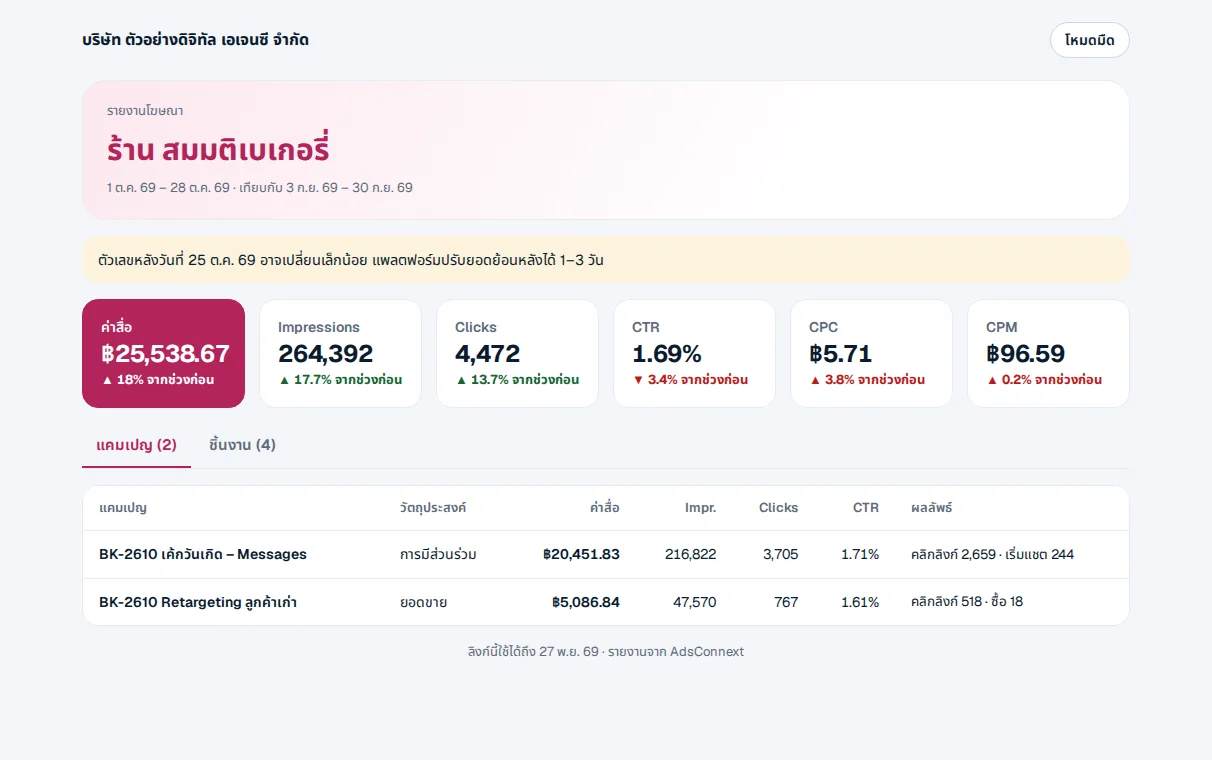
What the client sees
That client’s numbers for the chosen dates, with no menus or other clients’ data.
- 5 wrong PINs lock it for 15 minutes
- Links last at most 1 year
- Works on phone and computer
How it works
- 1Open the client’s reportA client or a client group
- 2Click ShareSet a PIN, an end date, hide spend
- 3Send the linkRevoke it from Shared links
Questions
Do clients need an account?
No. They open the link — with the PIN if you set one.
Do clients see full campaign names?
They see campaign names with internal codes such as CAMCODEs removed.
Who can make links?
Admins, team heads and the client’s AE.
More in AdsConnext
Get the whole company started today
Sign up with your e-mail, add employees and send everyone the LINE link. Our team helps you set up for free.
Start your 14-day free trial Talk to us
@bizconnext →