

BizConnext › AdsConnext › Features › Connect Meta Ads
Connect Meta Ads once — every chosen account pulled for you
Sign in with the Facebook account that runs your ads, choose the ad accounts to pull with 1, 3 or 13 months of history, then it refreshes every hour.
- Read-only
- 13 months of history
- Hourly refresh
- Many Business Managers
Sound familiar?
- Opening Ads Manager one account at a time
- History lost when the person in charge changes
- Worry that an outside tool edits campaigns
Connect once and the chosen accounts flow in; AdsConnext asks for read-only access and never edits campaigns on Facebook.
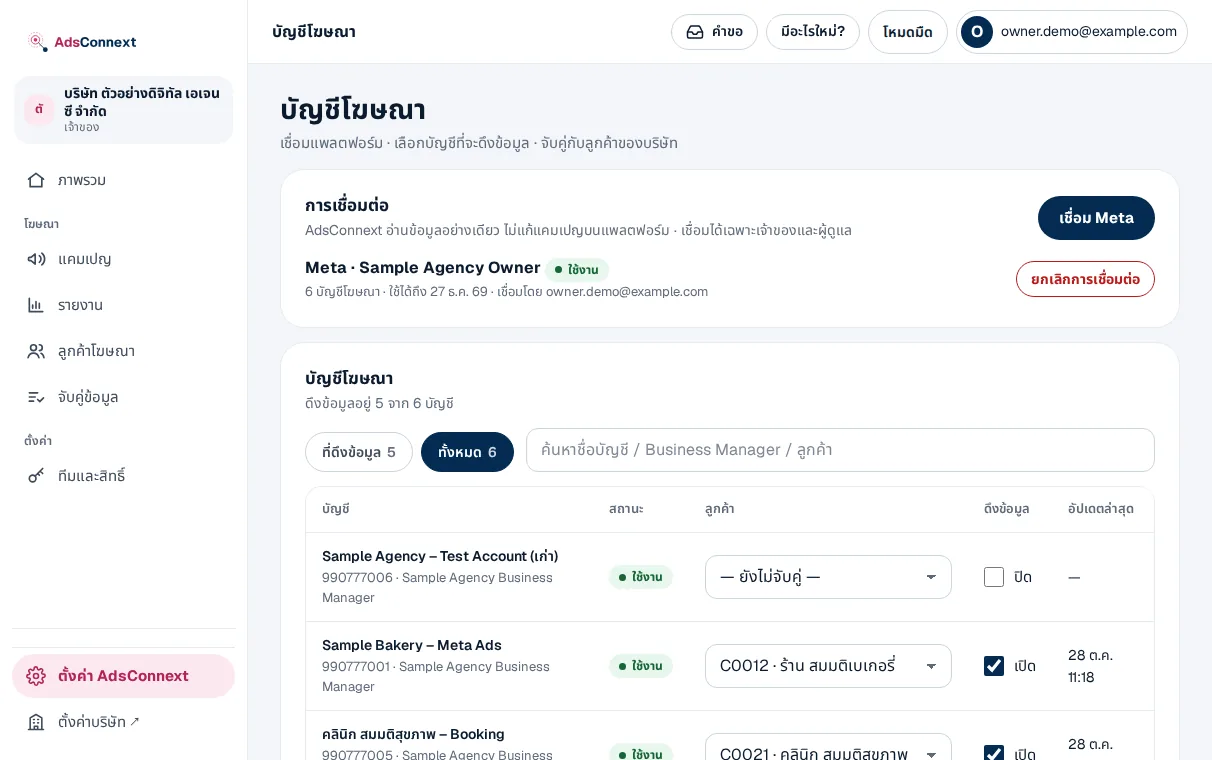
Choose the accounts to pull
Every ad account that Facebook login can manage; switch on only the ones you want and choose how far back to pull.
- Last pull status per account
- Switch off any time — data stays
- 3 accounts during the trial
How it works
- 1Click Connect MetaSign in with Facebook and allow read access to ads
- 2Choose ad accountsSwitch on pulling with 1, 3 or 13 months of history
- 3Data comes inHistory first, then every hour
Questions
Does AdsConnext change campaigns or spend for us?
No. It asks for read-only access (ads_read) and only shows the numbers.
Do the numbers match Ads Manager?
Yes. The last 3 days are read again every hour because platforms adjust them; differences stay within rounding.
What if the connection expires?
The Ad accounts page asks you to reconnect; data already pulled stays.
More in AdsConnext
Get the whole company started today
Sign up with your e-mail, add employees and send everyone the LINE link. Our team helps you set up for free.
Start your 14-day free trial Talk to us
@bizconnext →