

BizConnext › AdsConnext › Features › CAMCODE and rounds
A CAMCODE in the campaign name splits numbers by client and round
Put the client’s CAMCODE in the campaign name; it is matched to the client, rounds split by date, and extended campaigns or borrowed accounts are handled.
- Code read from the name
- Rounds by date
- Extended campaigns
- Borrowed accounts
Sound familiar?
- One account running ads for several clients
- Rounds mixing their numbers
- Spend landing on the wrong client from a borrowed account
The code in the campaign name tells the system whose it is, so numbers land on the right client and round — even from a borrowed account.
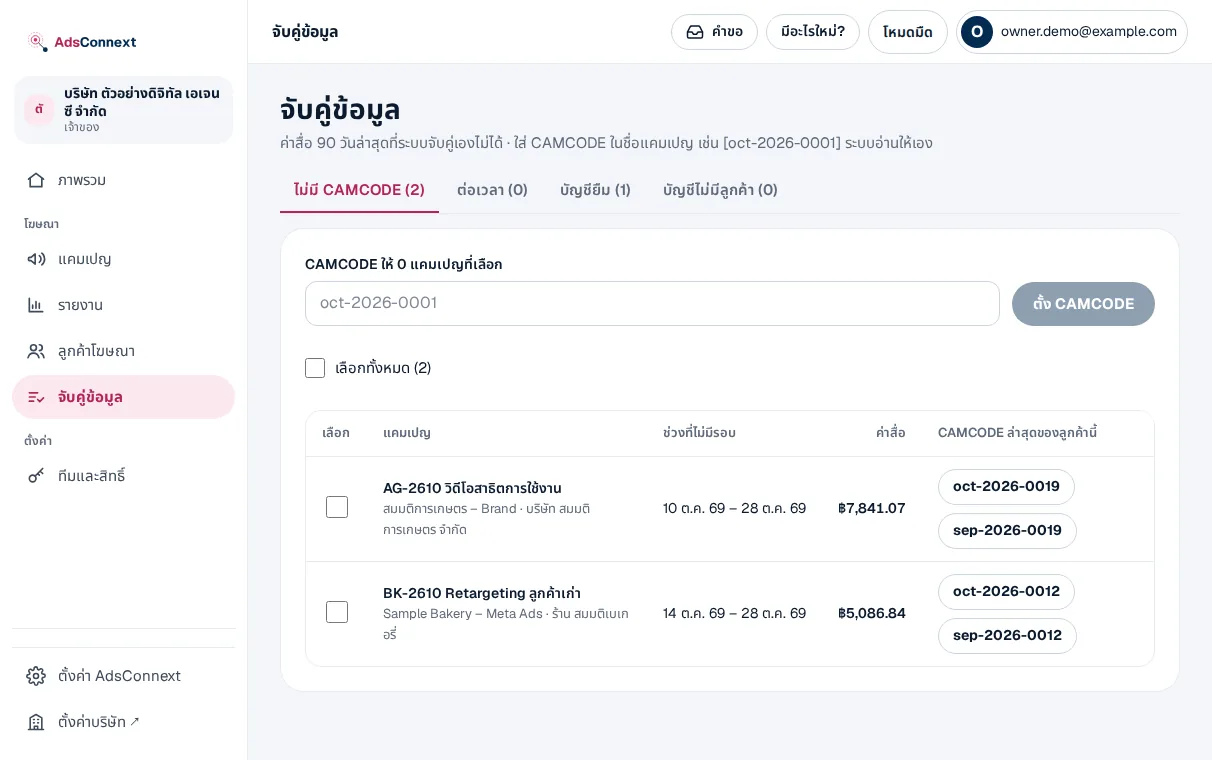
Matching queue
Campaigns without a code, or codes not yet linked to a client, wait in a queue with a suggested client.
- Codes read from campaign names
- A new code starts a new round from that day
- Mark extended campaigns
How it works
- 1Give clients codesLink a CAMCODE to each client
- 2Put the code in the nameIt is read from the campaign name
- 3Clear the queueUnmatched campaigns wait for the team
Questions
How should campaigns be named?
Put the CAMCODE in the name, e.g. [oct-2026-0012] Year-end sale (brackets optional); it is read from the campaign name.
Can the code change mid-round?
Yes; the new code starts a new round from the day it changes.
Can we run ads from another client’s account?
Yes; the code in the name wins over the account, so numbers go to the coded client.
More in AdsConnext
Get the whole company started today
Sign up with your e-mail, add employees and send everyone the LINE link. Our team helps you set up for free.
Start your 14-day free trial Talk to us
@bizconnext →